
BlowTorch MUD Client2.1 - Get APK
You'll be able to download in few seconds.
Publisher Description


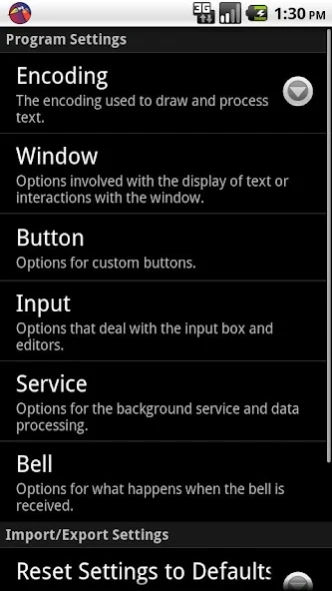
Mud with ease from your Android device! Check out BlowTorch today!
BlowTorch is a basic telnet client that supports the following features that people find helpful for playing MUDs.
MCCP Compression
ANSI Color Codes
Aliases
Triggers
Timers
As many custom buttons you can make!
BlowTorch now supports Portrait mode as well as Landscape mode!
MUD/MUSH/MOO Servers are text based games that operate similar to terminal applications. A host name and port are used to connect a player to a game. Game servers can be found at http://www.topmudsites.com and http://www.mudconnect.com
Custom buttons are made through long pressing the window where you want the button to be. Buttons can be grouped onto pages by using button sets accessible through the MENU button.
Triggers can be extended by turning off "Literal" parsing. This will enable regular expression parsing for the entered pattern. Capture group text may be replaced in response actions by using $1,$2,$3, etc, where the number specified is the index of the captured group.
Problems, Questions and Bug reports should be emailed to the developer email address for the quickest response.
Happy mudding!
About BlowTorch MUD Client
The company that develops BlowTorch MUD Client is Happy Goat Studios. The latest version released by its developer is 2.1.
To install BlowTorch MUD Client on your Android device, just click the green Continue To App button above to start the installation process. The app is listed on our website since 2018-12-01 and was downloaded 0 times. We have already checked if the download link is safe, however for your own protection we recommend that you scan the downloaded app with your antivirus. Your antivirus may detect the BlowTorch MUD Client as malware as malware if the download link to com.happygoatstudios.bt is broken.
How to install BlowTorch MUD Client on your Android device:
- Click on the Continue To App button on our website. This will redirect you to Google Play.
- Once the BlowTorch MUD Client is shown in the Google Play listing of your Android device, you can start its download and installation. Tap on the Install button located below the search bar and to the right of the app icon.
- A pop-up window with the permissions required by BlowTorch MUD Client will be shown. Click on Accept to continue the process.
- BlowTorch MUD Client will be downloaded onto your device, displaying a progress. Once the download completes, the installation will start and you'll get a notification after the installation is finished.
Program Details
System requirements
Download information
Pricing
Version History
version 2.1
posted on 2018-12-01
SD Card Permissions are now asked for.
Support fixes for newer android versions.
Fixed crash when touching the top of the window.
version 2.0
posted on 2016-08-28
This update should address the immediate crashing on tablet devices.,v2 includes Many new features. Lua Scripting, Basic Plugin and Mini window support. Automatic reconnection after disconnection.,The settings file format has changed. Old settings should be automatically exported to sdcard/BlowTorch/recovered/ if there is a problem upgrading or desire to downgrade.
version 1.1.1
posted on 2011-04-03
Several fixes and updates
Disclaimer
External Download
We do not host BlowTorch MUD Client on our servers. We did not scan it for viruses, adware, spyware or other type of malware. This app is hosted by Galad and passed their terms and conditions to be listed there. We recommend caution when installing it.
The APK Download link for BlowTorch MUD Client is provided to you by apps112.com without any warranties, representations or guarantees of any kind, so access it at your own risk.
If you have questions regarding this particular app contact the publisher directly. For questions about the functionalities of apps112.com contact us.
